

easyTest Tools ETT
Precision You Can Trust
NABL-Accreditied Calibration | Available on Request
NABL-Accreditied Calibration | Available on Request
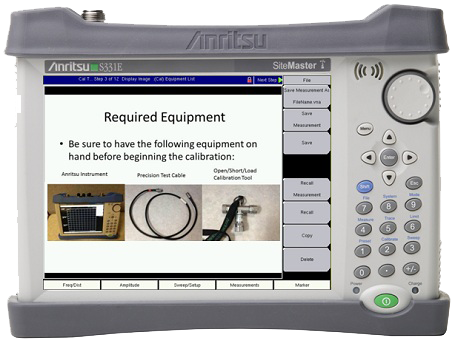
easyTest Tools (ETT) by Anritsu is a user-friendly software solution that empowers experienced RF professionals to create, share, and deliver guided test procedures for novice users. Designed to simplify cable and antenna testing, easyTest Tools ensures consistent, reliable measurements using automated setups, visual instructions, and intuitive prompts—making it perfect for field teams with varying expertise levels..
-
Single ETT file format consolidates setups, instructions, and images for easy distribution
-
Visual hook-up guides display connection diagrams and procedural images
-
Automatic test setups ensure instruments are configured correctly every time
-
Prompt-driven interface guides users through each step, including button presses
-
Auto-save function captures results without manual intervention
-
Compatible with Anritsu cable and antenna analyzers
-
Customizable templates using sample procedures included with the tool
-
Streamlined test execution via a simple icon on the instrument menu
-
Supports firmware recognition – instruments automatically detect ETT files
-
Ideal for team knowledge sharing – enables easy training and SOP adherence

| Parameter | Details |
|---|---|
| File Format | .ETT (easyTest Test File) |
| Compatibility | Anritsu cable and antenna analyzers |
| Setup Recall | Automatic upon procedure start |
| Prompt Type | Text prompts, button press notifications, image display |
| Result Saving | Auto-save to internal memory or storage |
| Procedure Templates | Included (modifiable by user) |
| User Levels | Designed for both novice and expert field engineers |
| Software Installation | Windows-based PC required for procedure creation |
| Distribution Method | Electronic sharing via email, USB, or network transfer |
| Instrument Interface | easyTest menu icon for direct execution |
