Precision You Can Trust
NABL-Accredited Calibration | Available on Request
UDE® Universal Debug Engine – Multi-Core Workbench adds powerful multi-core control to a familiar UDE interface. It lets you select cores, sync start and stop, load core-specific images, and analyze trace and coverage in one clean workspace. Ideal for complex SoCs and safety-critical workflows..
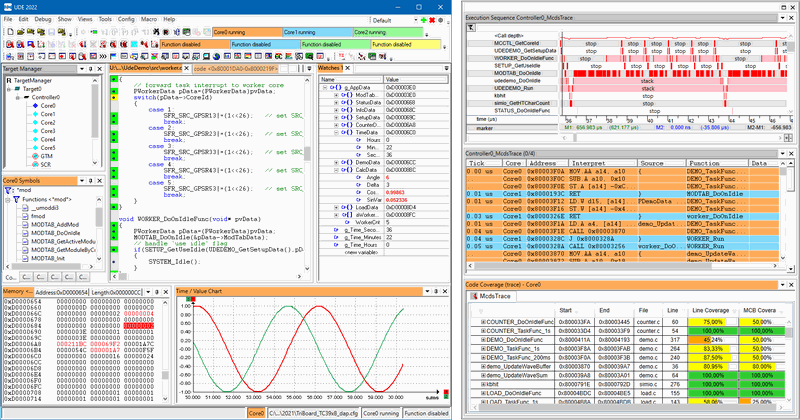
The UDE Multi-Core Workbench keeps multi-core debugging straightforward. You pick the cores and functional units you want to control, group them if needed, and drive them with shared start, stop, and step commands. This removes guesswork when coordinating complex interactions between CPUs, lockstep units, or accelerators.
Setup stays simple even with different toolchains. The built-in multi-core loader distributes binaries and attaches the right symbols per core, so you can compile modules independently and still debug them together. Visibility Groups and core-specific coloring keep windows organized, while time-based graphs let you watch variables from multiple cores in one place. For safety and performance work, you get graphical code coverage to support ISO 26262 evidence, plus profiling from instruction-pointer trace data. The Workbench reads common trace sources and on-chip emulators, then presents a single, synchronized view for event correlation and root-cause analysis.
Unified UI for selecting cores and functional units
Run Control Groups for common start, stop, and step across cores
Multi-core / multi-program loader with core-specific symbols
Visibility Groups and core-specific coloring for clear context
Graphical code coverage to help meet ISO 26262 goals
Profiling from instruction-pointer traces and on-chip emulators
Multi-core trace with common analysis across program and data
Universal Emulation Configurator (UEC) to define on-chip measurements
Parallel software test for heterogeneous cores in one session
Time-based variable plots from different cores in a single view
Product Name: UDE® Universal Debug Engine – Multi-Core Workbench Add-On
Multi-Core Control: Run Control Groups for synchronized start/stop/step across two or more cores
Target Selection: Manager to choose cores and functional units for debugging
Workspace Clarity: Visibility Groups, core-specific coloring, customizable layouts
Loader: Multi-core / multi-program loader for distributing binaries and symbols per core (ELF supported)
Coverage: Graphical structural coverage to support ISO 26262 workflows
Profiling Sources: Instruction-pointer traces and on-chip emulators (e.g., MCDS, SPU)
Trace Protocols: Aurora, Nexus, CoreSight ETM/ETB/TMC, instruction-pointer snooping, simulator outputs
Multi-Core Trace: Common analysis and visualization of executed code and data accesses
Measurement Setup: Universal Emulation Configurator (UEC) to define on-chip measurement tasks
Parallel Testing: Run and observe software on multiple cores, even with mixed architectures
Visualization: Time-based 2D plotting of variables from programs on different cores in one view